Match the reference
R5H004NAA identifies the consumable family.

Check the full product specification before ordering.
SKU: R5H004NAA
Available to order
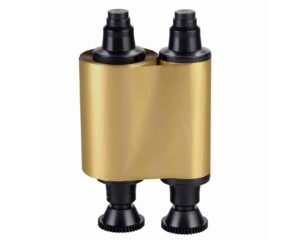
Evolis R5H004NAA half-panel YMCKO ribbon, rated for 400 prints. Use a colour area up to 35 × 54 mm, with the remaining text prepared for resin black. Check the printer generation before ordering.
Prices exclude VAT. Choose the exact pack or option you need.
R5H004NAA identifies the consumable family.
Half-Panel YMCKO consumable for the stated printing process.
Check layout, card stock and output requirements.
The Evolis R5H004NAA half-panel ribbon suits an ID card with a small colour photograph or logo and black personalisation elsewhere. Its nominal capacity is 400 prints per roll. The yellow, magenta and cyan panels are shorter than those in a full-panel ribbon, so the artwork must fit the supported colour area.
Evolis specifies a maximum colour-printed area of 35 × 54 mm. The black and overlay panels remain full length. For example, place the colour photograph within the allowed area and prepare the name, role and number for resin black. This ribbon is not a substitute for full-panel colour when the design needs a full-card colour background.
The manufacturer’s half-panel guide specifies true black artwork, RGB 0, 0, 0, for elements intended for the black panel. A dark colour that only looks black may use the colour panels instead. Check the driver’s black-panel settings and approve a sample using the final artwork.
Check R5H004NAA against your original Zenius or Primacy and the Evolis compatibility chart. The newer R5H204 family is listed separately. Therefore, do not assume this cassette will fit a Primacy 2 or Zenius 2 simply because it is also described as half-panel YMCKO.
Choose the ribbon around the card layout. Half-panel can suit a photograph with black details elsewhere. If colour must extend across the card, compare a suitable full-panel ribbon such as R5F008EAA for a compatible original Primacy. Check the exact model before changing references.
Use approved, clean cards with suitable printable surfaces, such as compatible blank white PVC cards. For pre-printed stock, test the surface and artwork together. Allow for test cards and reprints rather than treating the 400-print rating as a guarantee for every layout.
See the Evolis half-panel YMCKO guide for the colour area and artwork settings. You can also browse our Evolis ribbons or ask ACB to check the reference for your printer and design.
| Manufacturer reference | R5H004NAA |
|---|---|
| Ribbon | Half-Panel YMCKO |
| Nominal rating | 400-print nominal rating; match the print mode |
| Process | direct-to-card |
| Printer generation | Original Zenius / Primacy; match the full reference |
| Maximum colour area | 35 × 54 mm; follow the artwork and driver guide |
| Brand | Evolis |
| Product code | R5H004NAA |
Check the complete manufacturer specification, selected options and included items before ordering.
Dispatch depends on the exact product and availability. Confirm any required date with ACB. For personalised products, production follows artwork/proof approval and courier transit is separate.
Read the delivery & returns policyHave the product code, existing equipment or card reference, quantity and intended use ready. ACB can help you check what needs confirming.
Call 01308 426312Match the exact model, card format or attachment when choosing supplies and accessories.
CONTINUE EXPLORING
Explore more products and check the exact model, fitting or technology before ordering.