
Fine-detail retransfer output
600 × 600 dpi printing transfers the image onto the card using film.
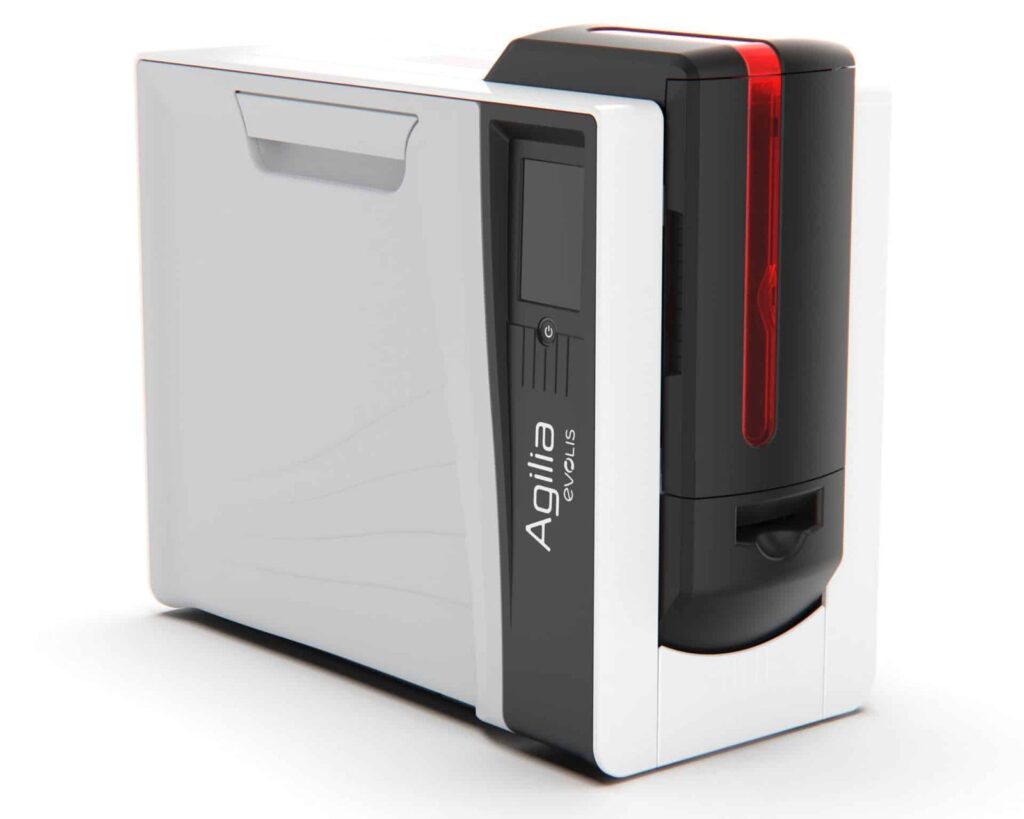
Check the full product specification before ordering.
SKU: AG1-0011
2 in stockLast stock check: 19:19, 30 Oct 2026 UK time
Dual-sided Agilia retransfer printer with 600 × 600 dpi output, USB 2.0 and Ethernet. Uses approved 0.76–1.25 mm CR80 cards, a compatible ribbon and separate retransfer film.
Prices exclude VAT. Choose the exact pack or option you need.
Evolis Agilia · Original manufacturer PDF.
Check the selected configuration and bundle contents against this product listing.
600 × 600 dpi printing transfers the image onto the card using film.
Automatic duplex printing for front and reverse designs.
The printer uses separate colour ribbon and retransfer film consumables.
The Evolis Agilia Duplex prints both sides of a CR80 card using 600 × 600 dpi retransfer technology. It prints the design onto transfer film before applying that image to the card, making it an option for detailed photo IDs and artwork that extends beyond the card edge.
Evolis specifies cards 0.76–1.25 mm thick, rather than thin 0.25 mm stock. Supported materials include approved PVC, composite PVC, PET, polycarbonate and ABS. Confirm the exact card construction, surface and any embedded chip with ACB before buying stock for a new project.
Agilia needs a compatible print ribbon and separate retransfer film. Clear film is rated for 1,200 images; YMCK and YMCK-K colour ribbons are rated for 600 prints. These are consumable image ratings, not a promise of the same number of finished two-sided cards. Two printed faces use additional film and the ribbon consumption depends on the selected mode. Retransfer film is not the same as a separate patch laminate.
USB 2.0 and Ethernet are standard. The input hopper holds up to 200 standard 0.76 mm cards, with a 100-card output hopper. The published speed is up to 100 cards/hour, ymck-k duplex, before allowing for your job settings, encoding and handling. Any magnetic, contact or contactless encoding requires the appropriate configured hardware and compatible software; a printed card is not automatically encoded.
Compare the single-sided Agilia. See the Evolis Agilia product information and Agilia technical sheet. Confirm your software licence and first set of ribbons and film with ACB.

Choose the Duplex configuration when your card needs a design on both faces. For example, keep the photograph and identity details on the front, with contact information or membership conditions on the reverse. Automatic card turning handles both faces in one print workflow.
Compare the RT5F102E100 YMCKK ribbon with the required RTCL100NAAA retransfer film. For colour on both faces, confirm the appropriate ribbon and mode. The ribbon rating does not remove the need for separate film or account for every two-sided layout.
No. Transfer film is part of the Agilia print process: it carries the printed design onto the card. A separate patch laminate is a different product and needs the appropriate lamination hardware and supplies. Ask ACB to check the complete setup if your project requires that extra finish.
Prepare the artwork for both faces and test the selected mode with the intended card stock. Allow for the second printed face, any encoding and handling time. Keep enough ribbon and film for the full run. You can also compare Evolis printers or choose ACB’s photo ID card printing service for finished cards.
| Model reference | AG1-0011 |
|---|---|
| Print mode | Dual-sided, retransfer |
| Resolution | 600 × 600 dpi |
| Card format / thickness | CR80, 0.76–1.25 mm |
| Input / output | 200 / 100 cards at 0.76 mm |
| Connections | USB 2.0 and Ethernet |
| Rated print mode | Up to 100 cards/hour, YMCK-K duplex |
| Clear transfer film | 1,200 images per roll |
| Colour ribbons | YMCK / YMCK-K: 600-print rating |
| Encoding | Requires a configured encoder and suitable software |
| Brand | Evolis |
| Product code | AG1-0011 |
Check the complete manufacturer specification, selected options and included items before ordering.
Dispatch depends on the exact product and availability. Confirm any required date with ACB. For personalised products, production follows artwork/proof approval and courier transit is separate.
Read the delivery & returns policyHave the product code, existing equipment or card reference, quantity and intended use ready. ACB can help you check what needs confirming.
Call 01308 426312Match the exact model, card format or attachment when choosing supplies and accessories.
CONTINUE EXPLORING
Explore more products and check the exact model, fitting or technology before ordering.


SKU: ACB-SMART51D
Choose an option to see stock

SKU: ACB-SMART31D
Choose an option to see stock
SKU: 3300-0021/3
Choose an option to see stock