
Badge Studio Plus included
Design and personalise cards on a supported Windows or Mac computer.
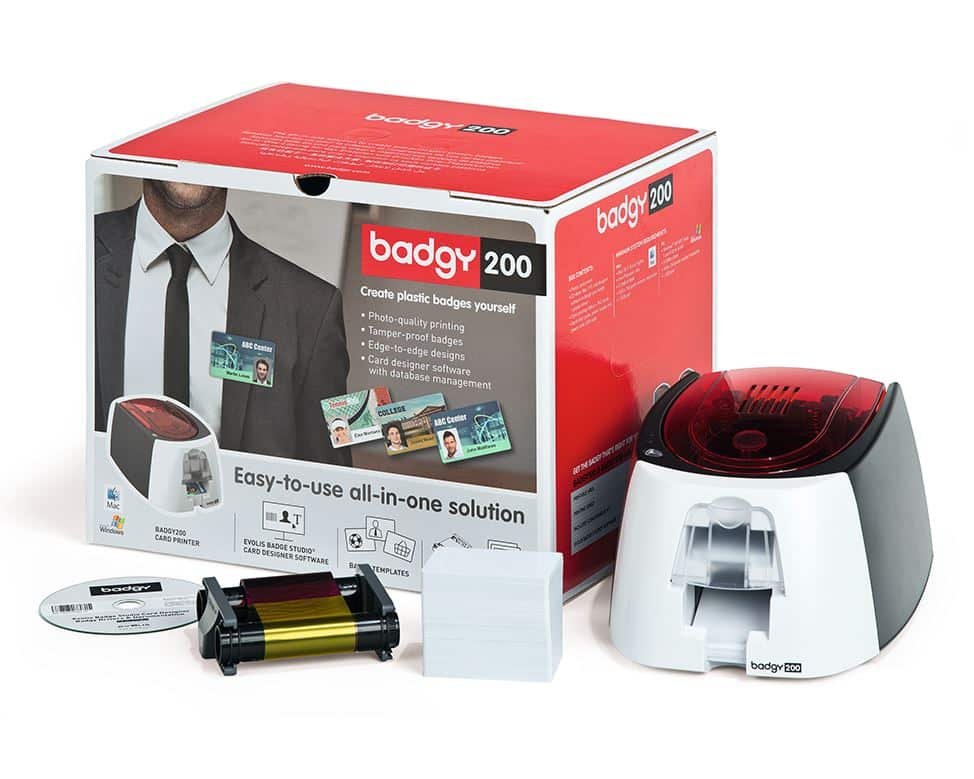
Check the full product specification before ordering.
SKU: B22U0000RS
Available to order
Single-sided Badgy200 with Badge Studio Plus for Windows and Mac, a 100-print starter colour ribbon and 100 cards. USB connection; approved CR80 cards 0.50–0.76 mm. Reverse printing requires manual refeeding.
Prices exclude VAT. Choose the exact pack or option you need.
Badgy 100 / 200 · Original manufacturer PDF.
Check the selected configuration and bundle contents against this product listing.
Design and personalise cards on a supported Windows or Mac computer.
Begin with a 100-print colour ribbon and 100 blank cards.
Use the software-guided refeed process to print the other face.
The Evolis Badgy200 ID card printer is a single-sided desktop card printer for occasional staff, visitor and membership cards. Badge Studio Plus provides card-design and database tools on supported Windows and Mac computers, so you can prepare a design and personalise it for each cardholder.
The Badgy200 package includes Badge Studio Plus, a starter colour ribbon rated for 100 prints and 100 blank cards. Check the publisher's current operating-system requirements before installation. Use approved CR80 PVC cards 0.50–0.76 mm thick; the input and output capacities are 25 cards at 0.76 mm or up to 40 at 0.50 mm.
The printer does not automatically flip a card. Badge Studio Plus supports a guided manual refeed workflow when you want to print on the reverse: follow the software instructions for card order and orientation. Printing colour on two faces consumes additional ribbon, so the 100-print rating is not 100 finished cards printed in colour on both sides.
The published Badgy technical sheet specifies 260 × 300 dpi resolution, approximately 38 seconds per colour card and 11 seconds per monochrome card. These are print-mode timings; allow extra time for design, handling and manual refeeding. The printer connects by USB.
See the manufacturer's Badgy printer comparison and Badgy100/200 technical sheet. Contact ACB if you need automatic duplex printing or help matching replacement ribbon and cards.
It is a starting point for small organisations that need to create staff, visitor or membership cards as required. Use the included design software to prepare a layout and personalise the details. For regular large batches or automatic two-sided printing, compare a more suitable model before buying.
Have your logo, cardholder details and photographs ready, then check the layout in Badge Studio Plus. Install the supported driver and software version for your computer. Next, load the approved cards and ribbon following the guide. Print a test card before starting a larger run.
No. Reverse printing uses the software-guided manual refeed process. Check the card order and orientation when reinserting cards. A colour design on each face also consumes more ribbon than a single-face design, so plan supplies around the finished cards you need.
Use the correct Badgy consumable reference, rather than assuming another Evolis ribbon will fit. Select approved CR80 card stock in the supported thickness range and confirm the replacement supplies with ACB. You can compare Evolis printers if your requirements grow, or use our photo ID card printing service for finished cards.
| Model reference | B22U0000RS |
|---|---|
| Print mode | Single-sided; manual refeed for reverse |
| Published resolution | 260 × 300 dpi |
| Card format / thickness | CR80 PVC, 0.50–0.76 mm |
| Input / output at 0.76 mm | 25 / 25 cards |
| Rated colour / mono time | 38 / 11 seconds per card |
| Connection | USB |
| Software | Badge Studio Plus, Windows / Mac |
| Starter supplies | 100-print colour ribbon and 100 blank cards |
| Automatic duplex | Not included; manual card turning required |
| Brand | Evolis |
| Product code | B22U0000RS |
Check the complete manufacturer specification, selected options and included items before ordering.
Dispatch depends on the exact product and availability. Confirm any required date with ACB. For personalised products, production follows artwork/proof approval and courier transit is separate.
Read the delivery & returns policyHave the product code, existing equipment or card reference, quantity and intended use ready. ACB can help you check what needs confirming.
Call 01308 426312Match the exact model, card format or attachment when choosing supplies and accessories.
CONTINUE EXPLORING
Explore more products and check the exact model, fitting or technology before ordering.


SKU: 651460


