Full-colour printing
Colour, resin black and clear overlay panels.
Check the full product specification before ordering.
SKU: 659366
571 in stockLast stock check: 18:41, 30 Oct 2026 UK time
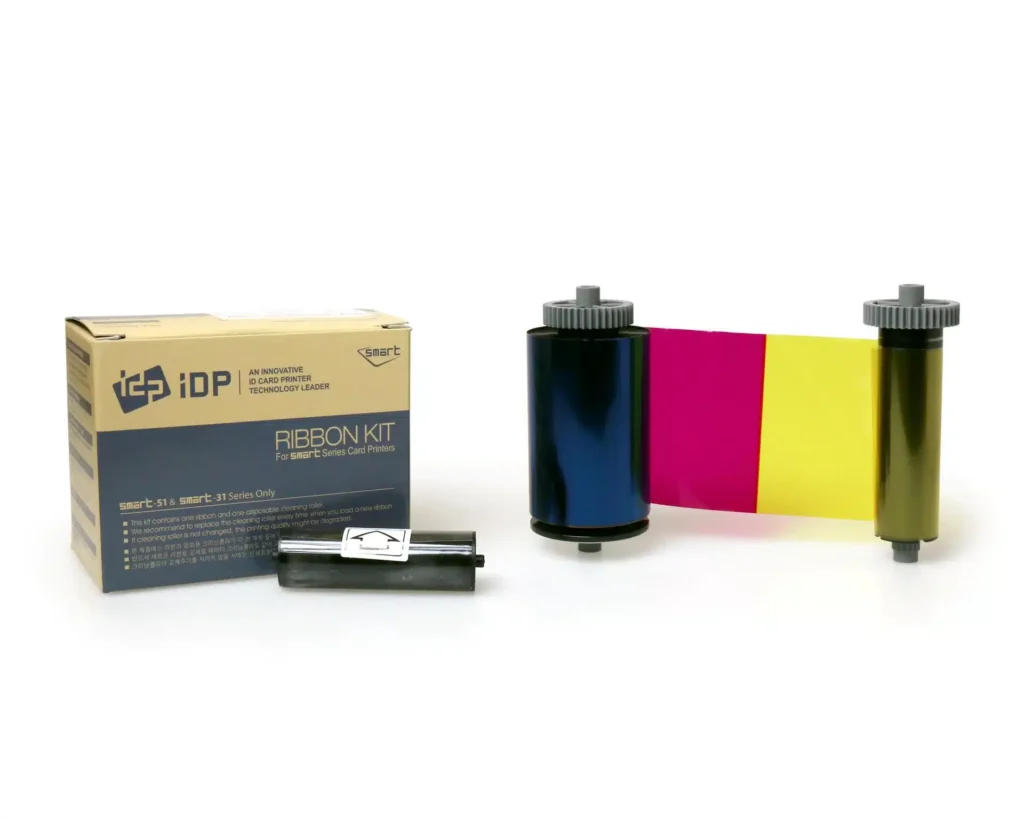
IDP Smart 659366 five-panel YMCKO colour ribbon for SMART-31 and SMART-51 printers. Nominal 250-print capacity with a cleaning roller. Suitable for colour photographs, branding and black text; match the exact printer and print mode.
Prices exclude VAT. Choose the exact pack or option you need.
Colour, resin black and clear overlay panels.
Manufacturer-listed ribbon capacity.
Listed for SMART-31 and SMART-51.

The IDP Smart 659366 ribbon is a five-panel YMCKO supply for the SMART-31 and SMART-51 printer families. Use it for staff photographs, membership designs and branded cards with colour artwork and black text. The manufacturer lists a nominal 250-print capacity and includes a cleaning roller.
Yellow, magenta and cyan reproduce the colour image. Resin black supports sharp text, line graphics and suitable barcodes, while the clear overlay covers the printed surface. Prepare your design and black-panel settings together, then check a sample with the intended barcode reader before a production run.
This ribbon suits a colour design on one face. If your card needs a colour front and a black reverse in automatic duplex mode, compare the IDP 659376 YMCKOK ribbon. For an additional fluorescent design feature, see the 659380 UV-panel ribbon.
Start with premium blank white PVC cards in a size and thickness supported by your printer. For access-control projects, review our MIFARE Classic 1K cards only after confirming your reader technology, card construction and any required encoder. Ribbon choice controls the printed artwork; access-system compatibility depends on the card and encoding setup.
Use the supplied cleaning roller as directed and keep IDP 659909 long cleaning cards available for the prescribed maintenance routine. Clean card surfaces and correct driver settings are useful starting points when checking print consistency.
IDP lists 659366 in its SMART-31 and SMART-51 consumables information. Check the exact model and reference on the existing roll before replacing it. A similar colour sequence on another printer family does not establish compatibility.
The 250 figure is the nominal ribbon rating. Two-sided colour work can consume more panels per completed card than a one-face job. Confirm the supported print mode and ribbon consumption for your front-and-reverse layout before calculating order quantities.
The overlay is a panel applied during printing. A separate laminate uses appropriate lamination hardware and supplies. If a project requires a laminated finish, specify that process as part of the complete printer setup.
If the design contains only black text, numbering or line art, compare the IDP 659367 black monochrome ribbon. Keep a colour ribbon for photographs and artwork that need multiple colours.
Follow the printer's loading and cleaning instructions, fit the cleaning roller as directed and choose the correct ribbon mode in the driver. Print a sample to check colour, text and placement before issuing the full batch.
Manufacturer reference: IDP SMART-31S specifications and consumables.
| Part number | 659366 |
|---|---|
| Ribbon panels | YMCKO |
| Rated capacity | 250 prints |
| Printer families | SMART-31 and SMART-51 |
| Included accessory | Cleaning roller |
| Brand | IDP |
| Product code | 659366 |
Check the complete manufacturer specification, selected options and included items before ordering.
Dispatch depends on the exact product and availability. Confirm any required date with ACB. For personalised products, production follows artwork/proof approval and courier transit is separate.
Read the delivery & returns policyHave the product code, existing equipment or card reference, quantity and intended use ready. ACB can help you check what needs confirming.
Call 01308 426312Match the exact model, card format or attachment when choosing supplies and accessories.
CONTINUE EXPLORING
Explore more products and check the exact model, fitting or technology before ordering.


SKU: RTCL100NAAA
23 in stock