
USB or Ethernet printing
Connect the single-sided printer to a supported desktop or network setup.
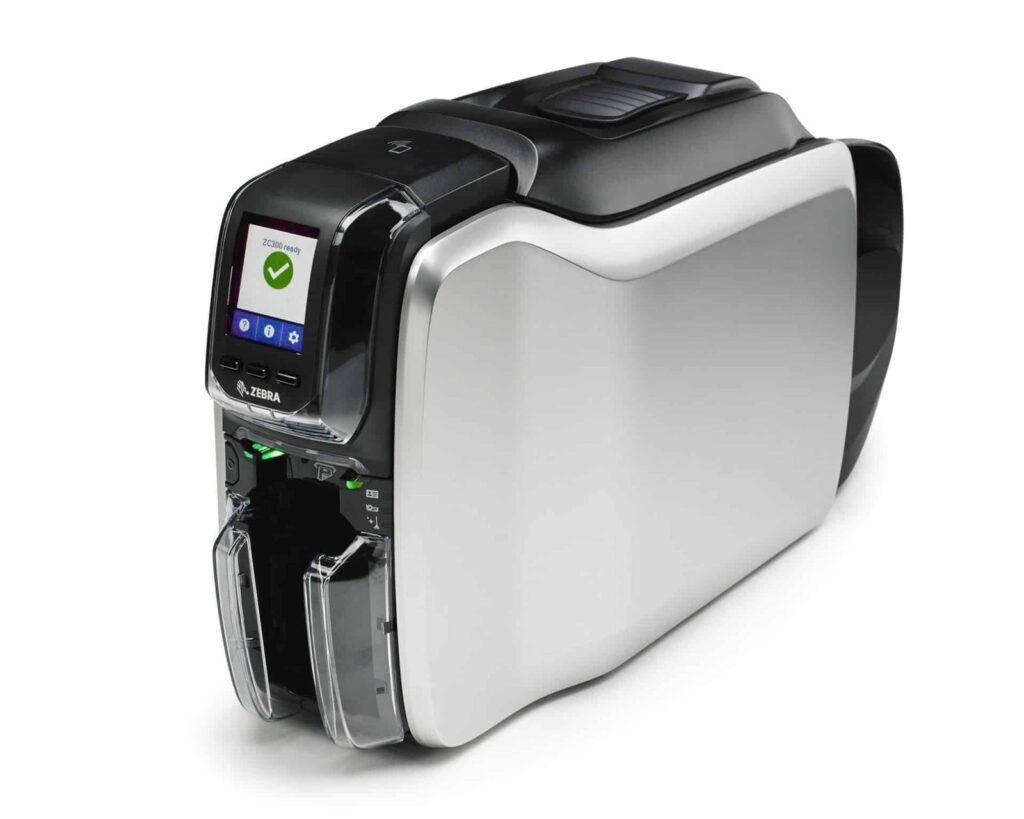
Check the full product specification before ordering.
SKU: ZC300
Available to order
Single-sided Zebra ZC300 with USB and Ethernet, 300 dpi direct-to-card printing, a colour LCD and 100-card input/output at 0.76 mm. Ideal for front-only staff and membership designs; confirm software and consumables.
Prices exclude VAT. Choose the exact pack or option you need.
Zebra ZC300 · Original manufacturer PDF.
Check the selected configuration and bundle contents against this product listing.
Connect the single-sided printer to a supported desktop or network setup.
Hoppers support batches of standard 0.76 mm cards.
Match ribbon and design software, then specify any required encoder.
The Zebra ZC300 single-sided card printer brings 300 dpi colour or monochrome printing to a desktop or network issuing station. This USB and Ethernet configuration is suited to staff ID, visitor and membership cards with a complete design on one face. A colour graphical LCD gives the operator clear status information and prompts.

Put the photograph, name, organisation and any barcode on the front of your card template. Automatic card-thickness adjustment and 100-card input/output hoppers at 0.76 mm support repeat batches. Use the manual feed when a single replacement card is needed.
Zebra specifies up to 200 YMCKO colour cards or 900 monochrome cards per hour for single-sided USB batch printing. These are mode-specific ratings; artwork processing, encoding, computer configuration and handling affect the finished job. Test your actual template before planning an issuing session.
For card stock, start with premium blank white PVC cards and confirm the selected size and thickness. Choose genuine, model-compatible supplies from our Zebra printer ribbons range. The Zebra ZC100/300 cleaning-card pack supports routine maintenance following the manufacturer instructions.
Choose a colour ribbon for photo badges, or a compatible black ribbon for monochrome text and graphics. Match the exact reference, printer model and regional supply requirements before ordering. Keep unprinted cards clean and handle them by their edges to help avoid marks on the print surface.
Yes. This listing specifies USB 2.0 and built-in 10/100 Ethernet. Plan the network connection with your IT team and check the current driver for the computers that will submit print jobs. Wi-Fi is a separate option and is not established by the Ethernet specification.
Choose single-sided when all information fits clearly on the front. For automatic reverse printing of terms, contact details or a second design, see the Zebra ZC300 dual-sided card printer. Buying the intended configuration helps keep the day-to-day issuing process straightforward.
Use only stock whose surface, dimensions and construction are approved for the printer. An access card must also match your existing reader system. Writing data to its chip needs appropriate fitted encoding hardware and compatible software. Print Touch NFC provides printer-help information and is not evidence of a fitted card encoder.
Prepare a design template, photographs or other data, compatible ribbon, blank cards and an appropriate software licence. Confirm the items included in the ACB offer before ordering. A ribbon's image count should be assessed against your chosen layout and print settings.
ACB's USB ZC100 also handles single-sided cards. The ZC300 offer adds the specified Ethernet connection, a graphical LCD and higher published single-sided throughput. Compare those practical requirements with your card volume and budget.
For occasional orders, you can also use our photo ID card printing service. Technical reference: Zebra ZC300 manufacturer specification sheet.
| Model | Zebra ZC300, single-sided |
|---|---|
| Print technology | Direct-to-card dye-sublimation / thermal transfer |
| Resolution | 300 dpi |
| Connections | USB 2.0 and 10/100 Ethernet |
| Input / output | 100 / 100 cards at 0.76 mm |
| Single-sided colour rating | Up to 200 cards/hour, YMCKO USB batch |
| Single-sided mono rating | Up to 900 cards/hour, USB batch |
| Standard stock | Approved CR80 PVC or PVC composite |
| Encoding | Requires the equipped configuration and software |
| Brand | Zebra |
| Product code | ZC300 |
Check the complete manufacturer specification, selected options and included items before ordering.
Dispatch depends on the exact product and availability. Confirm any required date with ACB. For personalised products, production follows artwork/proof approval and courier transit is separate.
Read the delivery & returns policyHave the product code, existing equipment or card reference, quantity and intended use ready. ACB can help you check what needs confirming.
Call 01308 426312Match the exact model, card format or attachment when choosing supplies and accessories.
CONTINUE EXPLORING
Explore more products and check the exact model, fitting or technology before ordering.

SKU: 3300-0021/3


SKU: 651302
