
Single-sided retransfer output
Apply a retransfer image to one face of a CR80 card.
Check the full product specification before ordering.
SKU: 89600
Available to order
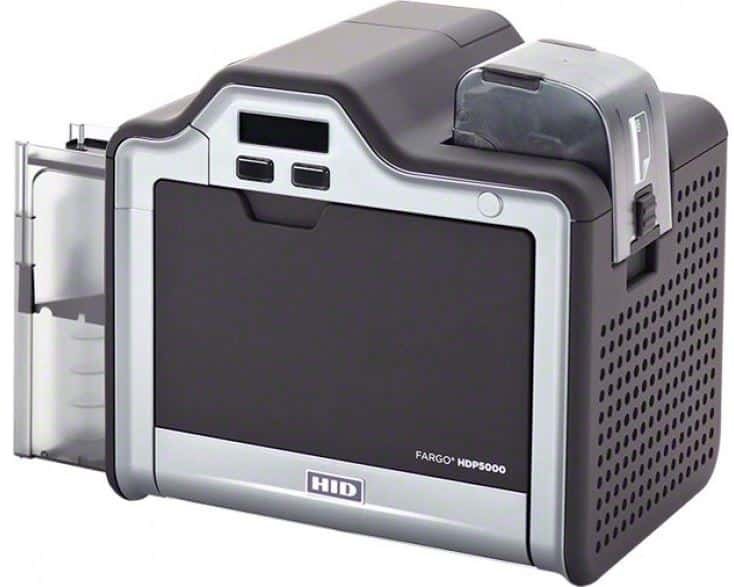
Original single-sided FARGO HDP5000 retransfer printer with 300 dpi output. Requires matching print ribbon and separate HDP film. Discontinued generation: confirm availability, compatible drivers and support.
Prices exclude VAT. Choose the exact pack or option you need.
Apply a retransfer image to one face of a CR80 card.
Match both consumables and their image ratings to the print job.
Confirm encoders, lamination, software and driver requirements.
The Fargo HDP5000 single-sided printer uses 300 dpi retransfer technology to personalise the front of a plastic ID card. It is a choice for layouts that keep the photograph, name and organisation branding on one face. This product is the original HDP5000, rather than the later HDP5000e generation.
HID marks the original model as discontinued. Before ordering, confirm the supplied unit, availability, condition, compatible computer driver and support terms with ACB. These checks matter when you want to keep an existing workflow or standardise supplies. Avoid treating the HDP5000 and HDP5000e names as interchangeable when choosing accessories or reading specifications.
The image is printed onto HDP film first, then transferred to suitable card stock. This process supports an over-the-edge design and is useful for approved printable technology cards. Prepare good-quality photographs and artwork before production; the printer resolution alone cannot improve an unclear source image.
This configuration prints one card face automatically. It suits designs with a blank reverse or suitable generic information already preprinted there. If the reverse needs holder-specific details, compare the dual-sided HDP5000. Alternatively, compare the single-sided HDP6600 for a different 600 dpi retransfer platform.
The original HDP5000 takes approved CR80 cards 0.762–1.27 mm thick. Standard capacities are 100 cards in the input hopper and 200 in the output hopper. An optional dual input hopper is rated for 30–40 mil stock, so its card range must be checked separately. USB 2.0 and Ethernet connections provide local and network setup options.
Both a compatible ribbon and separate transfer film are required for retransfer printing. Choose references for the original HDP5000 and match the ribbon to the artwork. Colour panels and resin-black printing serve different parts of the design. Confirm supply availability with ACB when browsing the Fargo ribbon range.
Compare our blank plastic cards after confirming material, thickness and printable finish. If lamination or encoding is needed, the stock must suit those processes too. A card's dimensions alone do not establish compatibility with every printer setup or access system.
The original user guide lists normal-mode rates of 103 cards per hour for YMCK and 73 for YMCKK. The 150-card-per-hour headline refers to YMC in performance mode, a different setting. Allow for artwork processing, encoding and additional processes when estimating a completed batch.
These are separately configured options. HDP film is part of the printing process, while a laminator applies additional material. A magnetic or contactless encoder needs to match the card technology and software. Printing an access-card design does not itself write data to its chip.
Confirm design software, a supported workstation, ribbon, film, approved cards and model-compatible cleaning supplies. Check HID's original HDP5000 page and manufacturer user guide, then ask ACB about the supplied configuration. If owning equipment is unnecessary for your job, our photo ID card printing service provides another route to finished badges.
| Model | Original FARGO HDP5000, single-sided |
|---|---|
| ACB reference | 89600 |
| Manufacturer status | Discontinued; distinct from HDP5000e |
| Print technology / resolution | Retransfer, 300 dpi |
| Card format / thickness | CR80; 0.762–1.27 mm |
| Standard input / output | 100 / 200 cards |
| Connections | USB 2.0 and Ethernet |
| Normal YMCK / YMCKK rates | 103 / 73 cards per hour |
| Consumables | Compatible ribbon plus separate HDP film |
| Lamination / encoding | Separate configured options |
| Brand | Fargo |
| Product code | 89600 |
Check the complete manufacturer specification, selected options and included items before ordering.
Dispatch depends on the exact product and availability. Confirm any required date with ACB. For personalised products, production follows artwork/proof approval and courier transit is separate.
Read the delivery & returns policyHave the product code, existing equipment or card reference, quantity and intended use ready. ACB can help you check what needs confirming.
Call 01308 426312Match the exact model, card format or attachment when choosing supplies and accessories.
CONTINUE EXPLORING
Explore more products and check the exact model, fitting or technology before ordering.


SKU: 651460

SKU: 50000
